
RCC Beam Reinforcement Details — A Practical Guide
Review RCC Beam Reinforcement through bar arrangement, anchorage, stirrups and drawing coordination, with attention to checked project-specific detailing.
আপনার প্রজেক্ট, এক জায়গায়
আপনার ভবন তৈরির খরচ কত হতে পারে?
তলার সংখ্যা, ছাদের আয়তন, মিস্ত্রির ধরন ও ভূমিকম্প অঞ্চল অনুযায়ী প্রাথমিক বাজেট দেখুন। লগইন করে ফ্রি হিসাব ব্যবহার করুন অথবা আপনার প্রকল্পের জন্য সেবার অনুরোধ পাঠান।
অ্যাকাউন্ট খোলা ও প্রাথমিক খরচের হিসাব বিনামূল্যে। নকশা ও অন্যান্য সেবার ফি লিখিত কোটেশন অনুযায়ী।
RCC Beam Reinforcement Drawing Software
This Excel VBA and AutoCAD workflow was developed to speed up repetitive RCC beam detailing and quantity-estimation tasks. It can prepare beam reinforcement drawings for several common support conditions and transfer the selected reinforcement information into a drawing. Every output must still be reviewed by the responsible structural engineer before it is issued for construction.
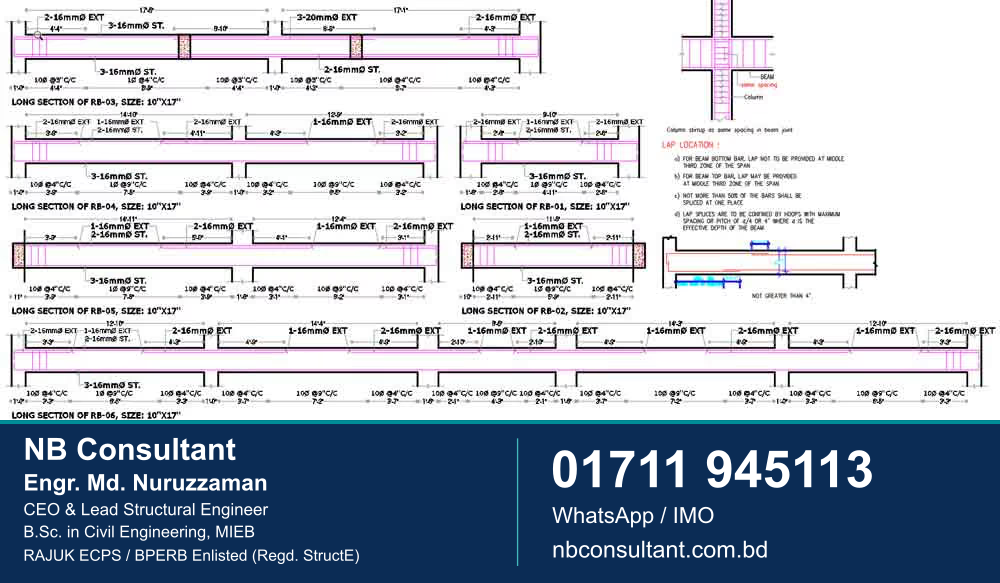
Functions described in the current version
- Simple-support, both-end continuous and one-end continuous beam layouts
- Beam and RCC column geometry with span and clear-length dimensions
- Main, extra and stirrup bar labels, spacing and placement
- Automatic beam numbering and reinforcement quantity estimates
- Up to 14 beam spans in one drawing workflow
The published options include 16 mm, 20 mm and 25 mm main bars and 10 mm stirrups. These are software input options, not design recommendations. Bar diameter, quantity, spacing, anchorage and detailing must come from project-specific structural calculations and the applicable code requirements.
Demonstration video
Watch the workflow in the RCC beam reinforcement detailing demonstration.
Licence information
The original published offer stated a lifetime licence for up to three PCs at US$200, activated against the computer ID. Price, compatibility, support and licence terms may change. Please confirm the current version and written terms before making a payment.
Before using generated drawings
This tool assists with documentation; it does not perform the professional judgment required for structural design. Verify the analysis model, design forces, member sizes, material grades, ductile detailing, drawing scale and quantity output for the specific project. Construction should follow drawings reviewed and signed through the appropriate professional process.
To ask about current availability or request a demonstration, contact NB Consultant.
Primary references and further reading
For the original publications and their stated scope, see BNBC 2020 — Bangladesh Government Press · ACI 318 — official code portal
Questions and practical next steps
What should I check when reviewing an RCC beam drawing?
Confirm the drawing reference and revision, the relevant member identification and the relationship with the coordinated structural documents. If a note or detail is unclear, obtain an explanation from the responsible engineer before using it.
Can a reinforcement sketch be copied to another building?
A published detail belongs to its stated design context. Member actions, dimensions, materials and design requirements must be considered for the actual project. Use examples for learning and arrange the required project-specific design or review.
যোগাযোগ
আপনার জমির জন্য উপযুক্ত নকশা নিয়ে প্রাথমিক পরামর্শ নিন
জমির মাপ, ভবনের ব্যবহার ও পরিকল্পনা জানালে আমরা পরবর্তী উপযুক্ত ধাপটি বুঝতে সাহায্য করব।